Deploying the same application to dev, staging, and prod means the YAML gets copied once per environment. Nearly all of it is identical — one replica count, one domain, a few ConfigMap values differ — yet those few lines turn one file into three. The bug where you fix one copy and forget the other usually starts right here.
Kustomize solves that with inheritance. It is a declarative configuration management tool that lets you transform Kubernetes objects however you need, and the core idea is to keep shared resources in a base and declare only the per-environment differences in an overlay.
Kustomize — Kubernetes native configuration managementThe official configuration management tool that composes and transforms Kubernetes objects with plain YAML, no templates kustomize.io
Kustomize was not part of kubectl from the start. It was announced in May 2018 by Google as a SIG-CLI subproject, a standalone CLI with its own repository at kubernetes-sigs/kustomize. To be precise it was less a third-party tool from an outside vendor than an independent tool born inside the Kubernetes project — but either way, using it meant installing a separate binary.
That changed with kubectl v1.14 in March 2019. The kustomize build flow was integrated into kubectl, making it usable through a single kubectl apply -k, and today the official Kubernetes documentation presents Kustomize as the way to manage objects declaratively. Being usable with no extra installation is the first place it diverges from Helm.
One thing is worth knowing, though: the version embedded in kubectl and the standalone binary were out of sync for a long time.
| kubectl version | Embedded kustomize version |
|---|---|
| v1.14 – v1.20 | v2.0.3 (frozen) |
| v1.21 onward | v4.0.5, updated regularly since |
What went into kubectl v1.14 was kustomize v2.0.3, and that version stayed frozen through kubectl v1.20 — nearly two years. Only in kubectl v1.21 did it move to v4.0.5, and it has been updated on a regular basis since. So newer syntax may simply not work with the kubectl on an older cluster; the patches and replicas fields covered later are typical examples. When behavior does not match the docs, comparing kubectl version against kustomize version is the fastest first check.
This post starts from the idea of declarative management and works through Base/Overlay structure, patch strategies, a hands-on project layout, and finally a comparison with Helm.
1. Declarative vs. Imperative
Understanding Kustomize starts with distinguishing the two ways Kubernetes handles resources: the imperative approach and the declarative approach.
The Imperative Approach
The imperative approach issues commands one at a time — “do this, then do that.” Resources get manipulated directly through individual commands.
kubectl create deployment nginx --image=nginx
kubectl scale deployment nginx --replicas=3
kubectl expose deployment nginx --port=80
That is convenient for simple work, but as environments grow more complex it gets hard to trace which commands were run, and reproducibility suffers. Above all, no document describing the cluster’s current state is left behind anywhere.
The Declarative Approach
The declarative approach describes “this is what the final state should be” in a YAML file, and Kubernetes compares it against the current state and applies only the necessary changes.
kubectl apply -f deployment.yaml
Its advantages:
- Idempotency: running the same command repeatedly produces the same result.
- Version control: YAML files live in Git, so change history is traceable.
- Automatic reconciliation: when the cluster’s state differs from what was declared, only the differences are applied.
In practice the declarative approach dominates when working with Kubernetes. When several people manage a cluster together, you need to know what a colleague changed — and if the change was never written down as code, there is no way to find out.
Kustomize makes that declarative approach considerably more powerful. When you apply resources assembled by Kustomize with kubectl apply -k, resources with no changes come back as unchanged, and only the ones that need changing are reported as created or configured.
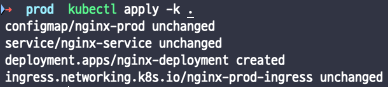
As the screenshot shows, resources that already exist are marked unchanged and only newly added ones are created. Running the command any number of times yields the same result — that is the heart of declarative management, and the property is called idempotency.
2. Base/Overlay Structure
Now that declarative management is clear, it is time to see what Kustomize adds on top of it.
Why Multi-Environment Management Is Needed
Running a service on Kubernetes eventually means deploying to several stages. The exact setup varies with the size of the organization and the nature of the product, but it generally simplifies to this.
Dev → Staging → Prod
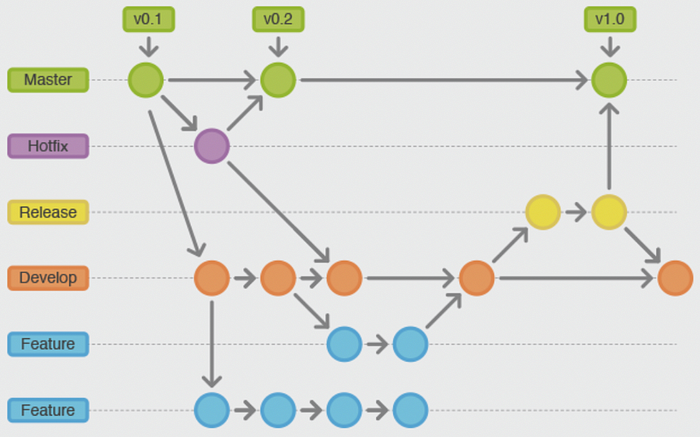
As in the diagram, the deployment environment is often determined by the Git branching strategy: the master branch maps to Production, release to Staging, and develop to Dev. And each environment differs subtly in its URL, database connection details, and compute resource allocation.
How do you manage those “slight differences” declaratively? That is exactly the problem Kustomize’s Base/Overlay structure solves.
The Base/Overlay Concept
The core idea of Kustomize is inheritance. Baseline resource definitions live in a base directory, and only the per-environment differences go into an overlay directory.
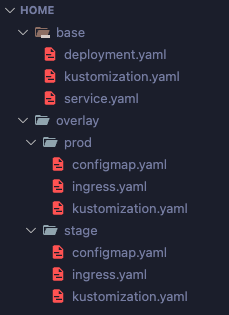
As shown, base holds shared resources such as deployment.yaml and service.yaml, while each environment under overlay (prod, stage) holds the configmap.yaml and ingress.yaml specific to it.
The Base kustomization.yaml
The kustomization.yaml in the base directory registers the shared resources.
apiVersion: kustomize.config.k8s.io/v1beta1
kind: Kustomization

resources:
  - deployment.yaml
  - service.yaml
The Overlay kustomization.yaml
Each environment’s kustomization.yaml inherits the base and adds its own resources.
apiVersion: kustomize.config.k8s.io/v1beta1
kind: Kustomization

resources:
  - ../../base
  - configmap.yaml
  - ingress.server.yaml
Pointing the resources field at ../../base inherits everything in the base. On top of that you declare the ConfigMap or Ingress that only this environment needs.
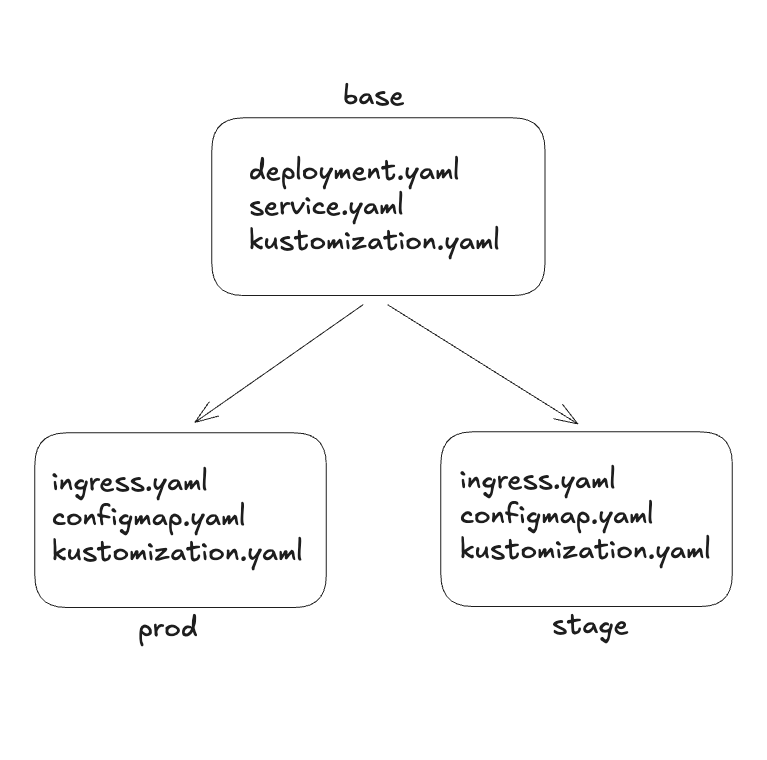
In short, one base is shared by many overlays. When a new environment is needed, you add one more directory under overlay and write only the few files that differ. However many environments there are, the shared part exists in exactly one place.
What splits per environment is usually predictable. Because prod and stage use different environment variables, ConfigMaps and Secrets get separated into overlays, and Ingress gets separated to assign different subdomains such as api.example.com and api.dev.example.com.
Say the Deployment in base declares replicas: 2, but another environment created as an overlay — test, for instance — only needs a single Pod. The inherited kustomization.yaml can change the replica count on its own.
You do not even need a separate patch file for that. Kustomize builds the most common transformations into kustomization.yaml as fields, so a few lines next to the inheritance declaration are enough.
# overlays/test/kustomization.yaml
apiVersion: kustomize.config.k8s.io/v1beta1
kind: Kustomization

resources:
  - ../../base
  - configmap.yaml
  - ingress.yaml

namespace: test
namePrefix: test-

replicas:
  - name: nginx-deployment
    count: 1

images:
  - name: nginx
    newTag: 1.25-alpine
What each field does:
namespace: sends every resource this overlay produces to thetestnamespace.namePrefix: prependstest-to every resource name. It does not just rename them — it also updates the places that reference those names, such as the ConfigMap name a Deployment points at.replicas: findsnginx-deploymentin the base and changes only its replica count to 1. The rest of the base definition is untouched.images: swaps the container image tag.
The key point is that the base was not touched at all, and no new YAML file was added to the overlay either. Transformations at this level stay entirely inside kustomization.yaml; only what cannot be expressed here moves on to patches.
Patch Strategies
When you need to change a value that already exists in the base rather than add a new resource, you use a patch. Kustomize offers two strategies.
Strategic Merge Patch
This overrides only specific fields of an existing resource. Because it understands the structure of Kubernetes objects when merging, writing down just the field you want to change leaves everything else at the base’s values.
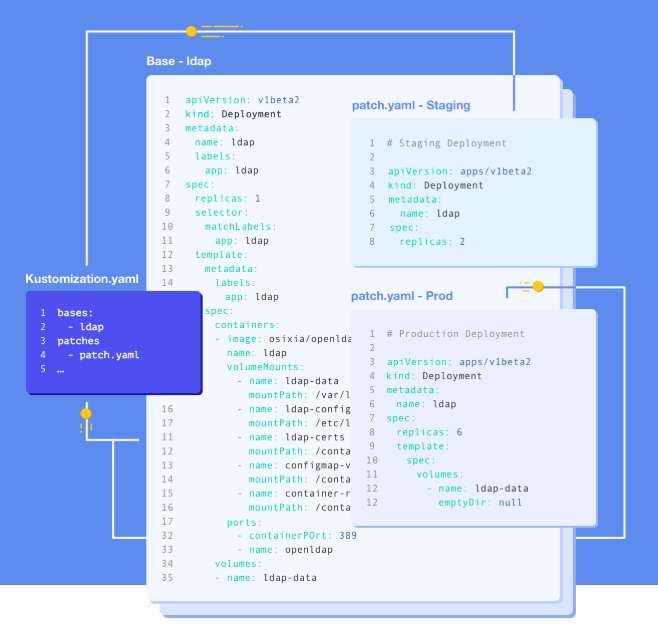
As in the diagram, the replicas of a Deployment defined in base can differ per environment: replicas: 2 in staging, replicas: 6 in production — one base, with only the differences described in patch files.
# overlay/prod/increase-replicas.yaml
apiVersion: apps/v1
kind: Deployment
metadata:
  name: nginx-deployment
spec:
  replicas: 6
This patch changes only replicas to 6 in the base’s Deployment and leaves the other fields alone. Which resource to patch is identified by metadata.name and kind.
JSON Patch
Use this when you need finer control. The JSON Patch (RFC 6902) format lets you add, remove, or replace the value at a specific path. It suits work that is awkward to express with a strategic merge patch, such as targeting a particular array index or deleting a field.
# overlay/prod/kustomization.yaml
apiVersion: kustomize.config.k8s.io/v1beta1
kind: Kustomization

resources:
  - ../../base

patches:
  - target:
      kind: Deployment
      name: nginx-deployment
    patch: |-
      - op: replace
        path: /spec/replicas
        value: 6
      - op: add
        path: /metadata/labels/environment
        value: production
3. A Hands-On Project
With the concepts covered, let’s build the directories and deploy.
The Scenario
Take a scenario that deploys the nginx image as a Deployment. The per-environment differences are as follows.
| Setting | Staging | Production |
|---|---|---|
| Subdomain | stage.localhost | prod.localhost |
| ConfigMap | this-is-stage-overlay | this-is-prod-overlay |
| Ingress name | nginx-stage-ingress | nginx-prod-ingress |
Running It
To deploy an environment composed with Kustomize, run the following from the directory containing that environment’s kustomization.yaml.
kubectl apply -k .
To see which resources would be created before deploying, use kubectl kustomize. It prints the assembled result without applying anything to the cluster, so it is worth making a habit of running it every time you edit an overlay.
kubectl kustomize .
The output looks like this.
apiVersion: v1
data:
  key: this-is-prod-overlay
kind: ConfigMap
metadata:
  name: nginx-prod
---
apiVersion: v1
kind: Service
metadata:
  name: nginx-service
spec:
  ports:
    - port: 80
      targetPort: 80
  selector:
    app: nginx
---
apiVersion: apps/v1
kind: Deployment
metadata:
  name: nginx-deployment
spec:
  selector:
    matchLabels:
      app: nginx-deployment
  template:
    metadata:
      labels:
        app: nginx-deployment
    spec:
      containers:
        - image: nginx
          name: nginx
          ports:
            - containerPort: 80
          resources:
            limits:
              cpu: 500m
              memory: 128Mi
---
apiVersion: networking.k8s.io/v1
kind: Ingress
metadata:
  labels:
    name: nginx
  name: nginx-prod-ingress
spec:
  rules:
    - host: prod.localhost
      http:
        paths:
          - backend:
              service:
                name: nginx-nginx
                port:
                  number: 80
            path: /
            pathType: Prefix
The Deployment and Service defined in base come through unchanged, alongside the ConfigMap and Ingress added by the prod overlay.
Common Patterns
The patterns that come up over and over in practice:
Adding shared labels
# kustomization.yaml
apiVersion: kustomize.config.k8s.io/v1beta1
kind: Kustomization

labels:
  - pairs:
      app: my-app
      team: platform
    includeSelectors: false

resources:
  - deployment.yaml
  - service.yaml
The commonLabels field you often see in older documentation was deprecated in Kustomize v5. It pushed labels all the way into a Deployment’s selector, so applying it to an already-deployed workload failed because selectors are immutable. The current approach uses the labels field as above, with includeSelectors stating explicitly whether selectors should change too.
Setting the namespace for everything
# overlay/prod/kustomization.yaml
apiVersion: kustomize.config.k8s.io/v1beta1
kind: Kustomization

namespace: production

resources:
  - ../../base
Overriding the image tag
# overlay/prod/kustomization.yaml
apiVersion: kustomize.config.k8s.io/v1beta1
kind: Kustomization

resources:
  - ../../base

images:
  - name: nginx
    newTag: 1.25-alpine
The image tag override is also the point a CI pipeline touches. Once a build finishes, updating just this field with kustomize edit set image and committing it means the deployment follows that commit.
Anti-Patterns
There are also patterns worth avoiding.
- Environment-specific settings in base: base should hold only resources common to every environment. Once something needed by a single environment moves into base, the overlay loses its meaning.
- Excessive patch nesting: past three levels of nested patches, the final result becomes hard to predict. Keeping it to two levels — base → overlay — is preferable.
- Sharing resources between overlays: each overlay should stand alone. Once overlays start referencing each other’s resources, dependencies appear and management gets complicated.
All three blur the answer to the same question: where do I look to know the final state of this environment?
4. Kustomize vs. Helm
Any discussion of Kustomize invites a comparison with Helm. The two look like they overlap in purpose, but their approaches differ.
Helm Charts and Their Limits
Helm acts as the package manager for Kubernetes, letting you pull in a preconfigured preset (a Chart) and deploy an application the way apt or pip would.
Before Kustomize was integrated into kubectl, though, multi-stage deployment in the Helm v2 era was awkward. It required running a server component called Tiller inside the cluster, and you had to first understand Helm-specific concepts such as Chart, Release, and Revision.
Kustomize emerged against that backdrop. It worked with plain YAML and managed configuration without any server component, which is why it caught on quickly and was eventually integrated into Kubernetes itself.
Comparison
| Criterion | Kustomize | Helm |
|---|---|---|
| Approach | Plain YAML overlays | Go templates |
| Learning curve | Low | Medium to high |
| Package distribution | Not supported | Chart repositories |
| Kubernetes integration | Built into kubectl | Separate CLI installation |
| Complex logic | Limited (patch-based) | Conditionals and loops |
| Template reuse | base/overlay inheritance | Chart dependency management |
| Rollback | Manual, via Git | Built-in helm rollback |
Choosing Between Them
Kustomize fits when
- managing per-environment configuration for internal applications
- doing multi-stage deployments where only simple settings differ
- declarative management is needed in a GitOps workflow
- you want to stay with plain YAML
Helm fits when
- authoring packages for external distribution (open-source projects and the like)
- configuration needs complex conditional branching
- version management through a chart repository is required
- rollbacks are needed frequently
Can They Be Used Together?
The two are not mutually exclusive. A common real-world combination installs third-party applications (Prometheus, the Nginx Ingress Controller) with Helm while managing per-environment configuration for internal applications with Kustomize. GitOps tools like ArgoCD support both Helm Charts and Kustomize, so you can split them by the nature of the resource.
5. Synergy with GitOps
If everything so far has been about Kustomize itself, the place this tool really earns its keep is GitOps.
GitOps is a methodology that manages infrastructure with Git as the single source of truth. Once every piece of infrastructure configuration is declared in a Git repository, change tracking and rollback fall out of Git naturally. Practicing it requires the whole system to be described declaratively — and that is the role Kustomize takes on.
ArgoCD, the best-known GitOps tool, watches the Git repository on an interval, detects changes, and applies them to the cluster automatically. Webhook-triggered flows are supported as well.
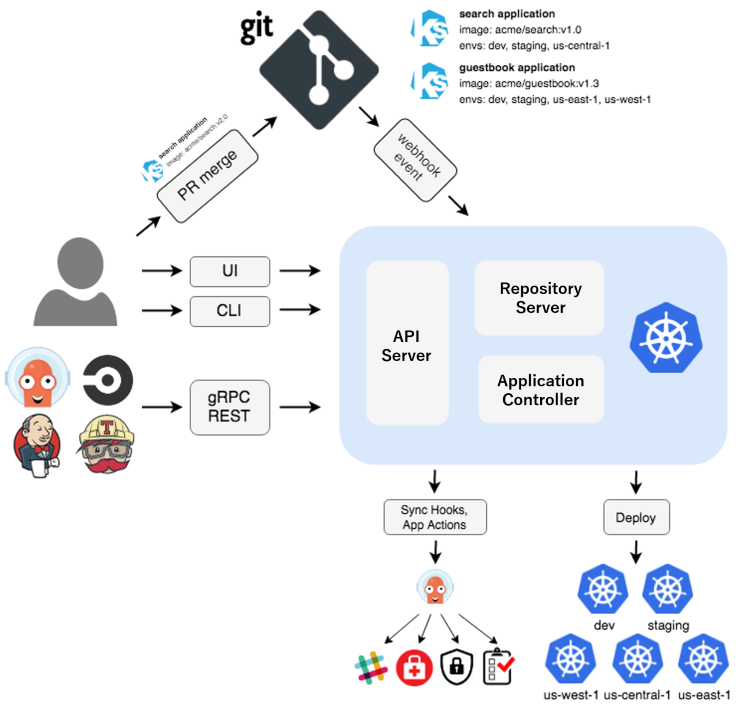
Because Kustomize is standalone with no server component of its own, it integrates smoothly with tools like ArgoCD and FluxCD. The result is a pipeline where a single commit propagates an infrastructure change. One catch is that in this structure every setting lands in Git as plain text; how to handle passwords and tokens is covered separately in handling secrets in GitOps.
Closing Thoughts
Kustomize follows the declarative management philosophy of Kubernetes faithfully. Its Base/Overlay structure organizes per-environment differences, and being built into kubectl means there is nothing extra to install.
The biggest thing I took from using it is that the real value of Kustomize is not in reducing duplicated YAML. Reducing duplication is only the result; the point is that the difference between environments surfaces in a single file. Open the overlay directory and you can read, at a glance, how this environment differs from the others. Compared with diffing whole files across three copies of the same YAML to answer “what was the prod-only setting again?”, this gets you the answer much faster. Conversely, an overlay that keeps growing is a signal that the environment layout itself deserves another look.
Next I want to write up approaches like ArgoCD’s ApplicationSet, which generates overlays automatically once the number of environments grows. Copying a directory by hand is fine at three or four environments, but when clusters are split per customer, that copying becomes duplication all over again.